
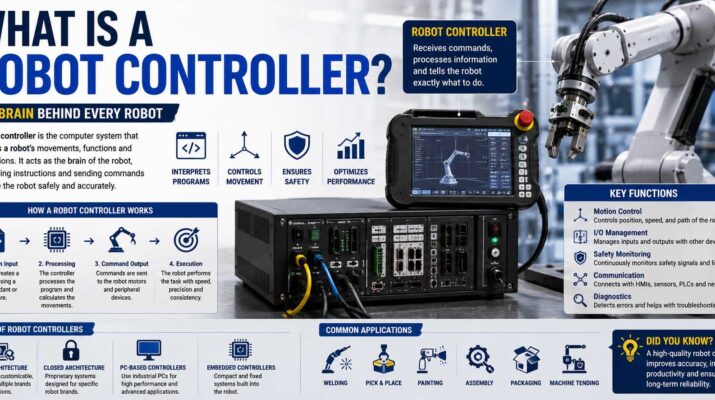
If you have ever watched a robotic arm weld a car body, pick products from a conveyor, or assemble tiny electronic parts, you may have wondered what tells the robot exactly what to do. What is a robot controller? In simple terms, it is the computer-based control system that receives instructions, processes sensor information, calculates movement, and sends commands to the robot’s motors and other hardware.
You can think of the controller as the robot’s decision-making and coordination center. The mechanical arm may perform the visible work, but the controller determines when, where, and how that movement happens.
Robot controllers are used in industrial automation, warehouses, laboratories, medical equipment, mobile robots, collaborative robots, and many other automated systems. Although different robots use different controller designs, most follow the same basic idea: read inputs, process instructions, and control outputs with precise timing.
What Is a Robot Controller?
A robot controller is an electronic system that manages the operation of a robot. It interprets programmed instructions and turns those instructions into commands that motors, drives, tools, and other robot components can understand.
For example, suppose an industrial robot needs to pick up a component from a conveyor and place it inside a machine. First, the controller receives information about the robot’s current position. Next, it calculates how each joint should move. Then, it sends commands to the appropriate motors. Finally, it checks sensor feedback to confirm that the movement happened correctly.
Because robotics combines mechanics, electronics, sensors, computing, and control systems, understanding what is mechatronics? provides useful background for seeing how all these technologies work together inside a robotic system.
The controller may be built into the robot, mounted inside a separate electrical cabinet, or integrated with a larger automation platform.
What Does a Controller in a Robot Actually Control?
If you are asking what is a controller in a robot, the answer extends beyond simply turning motors on and off.
A modern controller may handle:
- Joint position and speed
- Motor torque
- Motion paths
- Tool operation
- Sensor input
- Safety conditions
- Communication with other machines
- Program execution
- Error monitoring
- Coordinate systems
- Timing and synchronization
As a result, one controller can coordinate many actions at the same time.
For instance, during a welding operation, the controller might move six robot joints while controlling welding equipment, checking safety inputs, and exchanging status information with a production line.
How Does a Robot Controller Work?
A robot controller usually works through a continuous cycle of receiving data, processing it, issuing commands, and checking feedback.
First, the controller loads the robot program. That program may contain instructions for movement, waiting, gripping, welding, inspection, or communication.
Next, sensors tell the controller what is happening. Encoders can report motor or joint position, while cameras, force sensors, proximity sensors, and switches can provide other useful data.
Then, the controller calculates what should happen next. It may determine the required motor speed, direction, acceleration, and final position.
Finally, servo drives or motor-control circuits receive those commands and provide electrical power to the motors.
This process happens repeatedly at very high speed. Therefore, the controller can correct movement continuously instead of simply sending one command and hoping the robot reaches the target.
Feedback Makes Precise Motion Possible
Most advanced robots use closed-loop control.
In a closed-loop system, the controller compares the desired position with the robot’s actual position. If there is a difference, it adjusts the motor command.
For example, suppose the robot should rotate a joint to 45 degrees. The controller commands the movement, reads the encoder, and continues adjusting until the measured position closely matches the target.
This feedback process helps robots maintain accuracy even when speed, load, or resistance changes.
Main Components Inside a Robot Controller
Although designs vary, robot controllers normally contain several core components.
Central Processing Unit
The processor runs the robot’s control software and handles calculations.
It interprets program instructions, processes sensor data, performs motion calculations, and coordinates communication with other devices.
More complex robots may use multiple processors because motion control, safety, vision, and communication can require separate computing resources.
Memory and Storage
Robot programs, configuration files, calibration values, motion parameters, and system software need somewhere to reside.
Therefore, controllers usually include working memory as well as non-volatile storage.
Some industrial systems also support backups through network storage or removable media.
Servo Drives
A servo drive converts the controller’s commands into controlled electrical power for a motor.
The controller may request a specific speed, position, or torque. The servo drive then regulates the motor based on that command and incoming feedback.
Because motion depends heavily on these devices, understanding what is an actuator can also help explain how control signals become physical movement.
Input and Output Modules
Input/output modules, commonly called I/O, allow the robot to interact with external equipment.
An input might tell the robot that a part has arrived. Meanwhile, an output could tell a gripper to close or a conveyor to start.
This interface is especially useful in automated manufacturing cells where robots work alongside sensors, machines, safety devices, and programmable logic controllers.
Robot Controller vs Robot Brain
People often describe a controller as the robot’s brain. That comparison is useful, although it is not perfect.
A controller does process information and issue commands. However, many robots also rely on separate systems for machine vision, artificial intelligence, safety, networking, or task planning.
Therefore, the controller may act more like the central coordinator than the only intelligent device in the system.
For a simple robot, one controller may handle nearly everything. In contrast, an advanced autonomous robot may distribute processing across several computers.
Types of Robot Controllers
Robot controllers can be grouped by their architecture and the type of robot they control.
| Controller Type | Common Use | Main Characteristic |
|---|---|---|
| Industrial robot controller | Manufacturing robots | High precision and reliability |
| Embedded controller | Small or mobile robots | Compact and integrated |
| PC-based controller | Research and advanced automation | Flexible computing environment |
| PLC-based controller | Factory automation | Strong machine integration |
| Motion controller | Multi-axis machines and robots | Specialized motion calculations |
| Collaborative robot controller | Cobots | Integrated safety and easy programming |
Industrial Robot Controllers
Industrial robotic arms usually have dedicated controllers supplied by the robot manufacturer.
These systems are designed for reliable operation over long production cycles. They also support motion planning, safety functions, I/O communication, diagnostics, and robot-specific programming languages.
Embedded Controllers
Smaller robots may use embedded control boards instead of large controller cabinets.
For example, educational robots, drones, small mobile platforms, and consumer robots can run on microcontrollers or compact single-board computers.
These systems use less space and power, although their processing capability may be lower than that of industrial controllers.
PC-Based Controllers
Some robotics platforms use standard industrial computers.
This approach can provide strong processing performance and greater software flexibility. Therefore, PC-based control is common in research, machine vision, AI-assisted robotics, and specialized automation systems.
How Robot Controllers Are Programmed
Robot programming tells the controller what sequence of actions to perform.
Different manufacturers use different programming environments. However, most systems provide commands for movement, logic, timing, variables, I/O, and error handling.
A beginner who understands basic coding concepts such as variables, loops, conditions, and functions will usually find robot programming easier to learn.
Still, industrial robot programming is not identical to ordinary application development. Motion instructions must also account for coordinates, speed, acceleration, tool orientation, and safety.
Teach Pendant Programming
Many industrial robots use a handheld device called a teach pendant.
An operator can move the robot manually, save positions, adjust speeds, test programs, and view errors through the pendant.
This approach works well for tasks such as welding, machine loading, and palletizing because technicians can teach positions directly beside the robot.
Offline Programming
Offline programming allows engineers to create or simulate robot programs on a computer before sending them to the real machine.
As a result, a factory can test paths and identify possible collisions without stopping production equipment for long periods.
Simulation is especially useful for large robotic cells with many moving devices.
Sensors, Instrumentation, and Robot Control
A controller becomes much more useful when it can measure what is happening around the robot.
For example, an encoder tells the system where a joint is positioned. Meanwhile, a force sensor can tell the controller how strongly the robot is pressing against an object.
Anyone studying what is instrumentation will recognize this same principle: sensors and measurement systems convert physical conditions into signals that a controller can process.
Other common robot sensors include cameras, proximity sensors, limit switches, laser scanners, temperature sensors, and torque sensors.
The controller can then use these inputs to adapt robot behavior.
Communication Between Robot Controllers and Other Equipment
Modern robots rarely operate alone.
A controller may communicate with programmable logic controllers, conveyors, cameras, databases, manufacturing software, safety systems, and other robots.
Common industrial communication methods include Ethernet-based networks, fieldbus systems, digital I/O, and serial connections.
Through these connections, a robot may receive commands such as “part ready,” “machine door open,” or “start cycle.”
It can also transmit information such as “task complete,” “fault detected,” or “waiting for material.”
For remote systems, understanding what is telemetry also helps explain how machines transmit operating data, status information, and measurements to another location.
Robot Controller Safety Functions
Safety is a major part of robot control.
Industrial robots can move quickly and generate significant force. Therefore, controllers often integrate with emergency stops, safety gates, light curtains, area scanners, and other protective devices.
If a safety circuit detects an unsafe condition, the controller may stop movement or reduce operating speed.
Collaborative robots can include more advanced safety features. For example, some systems monitor force, speed, or separation distance so humans and robots can work closer together.
However, the robot controller alone does not make an application safe. Proper risk assessment, installation, guarding, programming, and maintenance remain necessary.
Common Robot Controller Problems
Like other industrial electronics, controllers can develop faults.
Robot Does Not Start
First, check power, emergency-stop circuits, safety interlocks, and fault messages.
A robot may refuse to start even when its controller is working correctly because a safety condition has not been cleared.
Position Errors
If the robot cannot reach expected positions, possible causes include encoder problems, calibration errors, mechanical wear, incorrect tool data, or program changes.
Therefore, technicians should determine whether the problem is electrical, software-related, or mechanical before replacing hardware.
Communication Errors
Network problems can prevent a controller from communicating with PLCs, cameras, or other machines.
In that case, inspect cables, connectors, network settings, device addresses, and communication configuration.
Overheating
Controllers need proper ventilation.
Blocked filters, failed cooling fans, dust buildup, or high ambient temperature can cause excessive heat. Therefore, regular inspection of controller cabinets can prevent avoidable shutdowns.
Program or Configuration Problems
An incorrect parameter or edited program can make a robot behave differently without any hardware failure.
For that reason, keeping current backups of robot programs and configuration files can make troubleshooting much easier.
Benefits of Modern Robot Controllers
Modern controllers provide much more than basic motor control.
They can coordinate multiple axes smoothly, execute complex motion paths, react to sensor input, record diagnostic information, and connect robots to larger production systems.
They also make robots more flexible. Instead of rebuilding a machine for every new task, an engineer can often change the robot program, tooling, or configuration.
As processing power improves, controllers can also support functions such as machine vision, predictive maintenance, force control, path optimization, and AI-assisted decision-making.
Frequently Asked Questions
What is a robot controller in simple terms?
A robot controller is the electronic system that tells a robot how and when to move. It runs programs, reads sensors, calculates movement, and sends commands to motors and other hardware.
Is a robot controller the same as a PLC?
No. A PLC usually controls broader industrial processes and machine logic, while a robot controller specializes in robotic motion. However, the two often communicate and work together.
Does every robot need a controller?
Yes, although the controller can take different forms. A large industrial robot may use a dedicated cabinet, while a small robot may use a microcontroller or embedded computer.
Can a robot controller use AI?
Yes. Some modern systems can integrate AI-based vision, planning, or decision-making. However, traditional motion control still relies heavily on deterministic control algorithms because movement must remain accurate and predictable.
What is the difference between a robot controller and a motor driver?
The controller determines what the robot should do. A motor driver or servo drive then regulates the electrical power supplied to a motor. Therefore, the controller operates at a higher decision-making level.
Can robot controllers be replaced?
Yes, but replacement can be complicated. Configuration files, calibration data, robot programs, safety settings, and communication parameters may need to be restored or reconfigured.
A Simple Way to Think About Robot Controllers
The easiest way to understand a robot controller is to follow the flow of information.
A program tells the robot what task to perform. Sensors report what is happening. The controller processes both sources of information and calculates the required movement. Servo drives then power the motors, while feedback tells the controller whether the movement occurred correctly.
That cycle repeats constantly while the robot operates.
So, when someone asks what is a robot controller?, the practical answer is that it is the control system that connects robot software with physical movement. Without it, motors, sensors, and mechanical joints would exist as separate parts. With a controller coordinating them, those parts can operate as one accurate and programmable robotic system.