
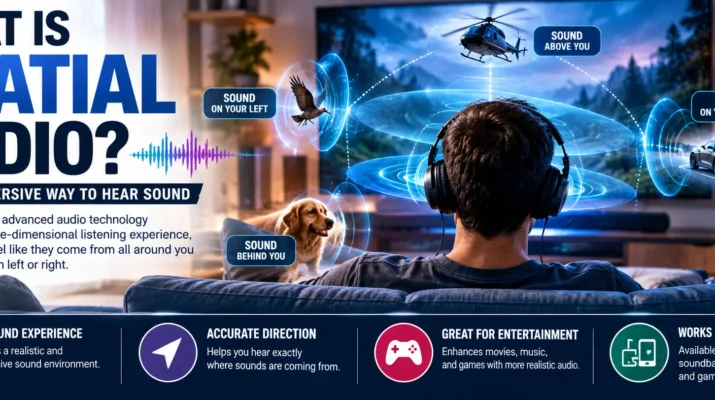
If regular stereo places sound mainly to your left and right, what is spatial audio and why does it sound different? Spatial audio is a group of technologies designed to make sound feel as though it comes from different positions around you rather than only from two speakers beside your ears. Depending on the system and content, sounds can seem to appear in front, behind, beside, or even above you, creating a more three-dimensional listening experience.
You may encounter spatial audio while watching movies, listening to music, playing games, using headphones, or joining online meetings. However, not every implementation works in exactly the same way.
Some systems use multichannel or object-based audio. Meanwhile, others use software processing to create a virtual surround effect through ordinary headphones.
Understanding those differences makes it much easier to decide when is useful and when standard stereo may be enough.
What Is Spatial Audio in Simple Terms?
Spatial audio creates the impression that individual sounds occupy positions in the space around the listener.
With ordinary stereo, audio is primarily divided between left and right channels. Therefore, a guitar might appear slightly left of center while a singer seems to stand in the middle.
Spatial audio can create a broader sound field.
For example, during a movie scene, you might perceive dialogue in front of you, traffic beside you, and an aircraft moving overhead. Likewise, a game can position footsteps or environmental sounds around the player when the game, audio engine, and playback setup support those effects.
The concept is related to other immersive technologies. If you have wondered how does virtual reality work, sound is particularly relevant because convincing audio can help a virtual environment feel more connected to the direction in which you are looking.
However, spatial audio is not limited to virtual reality. Phones, computers, headphones, soundbars, home theater systems, games, streaming services, and communication software may all use some form of spatial processing.
How Does Spatial Audio Work?
Spatial audio works by controlling how your brain perceives the location, distance, and movement of sounds.
Your ears do not receive exactly the same sound at exactly the same moment. For instance, a noise coming from your left generally reaches your left ear differently from your right ear. Your brain uses these differences, along with other acoustic cues, to estimate where a sound originated.
Headphone-based attempts to reproduce some of those cues electronically.
Binaural Processing
Binaural audio uses differences between the signals reaching each ear to create a sense of direction and space.
When reproduced correctly through headphones, binaural recordings or processing can make certain sounds seem to exist outside your head.
However, results vary between listeners because everyone’s ears, head shape, playback equipment, and hearing perception differ.
Surround and Object-Based Audio
Traditional surround sound assigns audio to channels such as front, center, rear, or overhead speakers.
By comparison, object-based audio can describe certain sounds as objects with positional information. A compatible playback system can then determine how to reproduce those objects using the available speakers or headphones.
As a result, spatial presentation can adapt more flexibly to different playback systems.
Head-Related Transfer Functions
A head-related transfer function, often shortened to HRTF, models how sound changes before reaching your ears based on its direction.
Software can use this information to simulate directional sound through headphones.
Consequently, you may perceive a sound as coming from somewhere in the room even though the physical drivers remain directly beside your ears.
What Is Spatial Audio on AirPods?
People searching what is spatial audio AirPods are usually referring to Apple’s features available with compatible AirPods, Beats products, Apple devices, apps, and content.
Depending on the hardware and content, Apple’s implementation can create an immersive listening experience and may support head tracking.
With head tracking enabled, the perceived position of compatible audio can respond as you move your head. For example, sound associated with the screen may appear to remain oriented toward the device rather than rotating with your headphones.
This can make movie and TV audio feel more like listening to speakers positioned in a physical room.
However, feature availability can vary according to the AirPods model, Apple device, operating system, content format, and app. Therefore, users should check the settings and compatibility information for their particular devices rather than assuming every AirPods model supports every spatial feature.
Fixed Spatial Audio vs Head-Tracked Audio
Not all spatial listening experiences respond to head movement.
With a fixed spatial presentation, the immersive sound field generally stays oriented relative to your head. Therefore, when you turn your head, the perceived sound field moves with you.
Dynamic head tracking behaves differently.
Compatible devices use motion sensors and software processing to account for head movement. As a result, certain sounds can appear anchored toward a screen or another reference point.
That difference matters most for video and other visual media. For music, however, some listeners may prefer a fixed presentation because they do not necessarily need the soundstage anchored to a screen.
So, neither option is automatically better. Instead, the best setting depends on the content and your listening preference.
What Is Personalized Spatial Audio?
If you are asking what is personalized spatial audio, the key idea is customization.
A generic spatial audio system has to make assumptions about how directional sound reaches a typical listener’s ears. Yet people’s physical features differ, so the same processing may not create exactly the same spatial impression for everyone.
Personalized systems attempt to tailor that processing more closely to an individual listener.
Apple, for example, offers Personalized on compatible hardware. The setup can use supported device sensors to create a personal profile related to the shape of your head and ears.
Consequently, the system can adapt its spatial processing rather than relying only on a generalized model.
Still, personalized processing does not mean every song or movie will automatically sound better. Content quality, mixing, headphones, settings, and personal preference remain significant factors.
Spatial Audio vs Stereo: What’s the Difference?
Stereo and spatial audio approach the listening experience differently.
| Feature | Stereo | Spatial Audio |
|---|---|---|
| Basic sound field | Left and right | Can simulate sound around the listener |
| Headphones required | No | No, but many implementations support them |
| Directional effects | Limited compared with spatial systems | More extensive when properly supported |
| Head tracking | Typically no | Available in some systems |
| Content support | Extremely common | Depends on platform and format |
| Best use | Music, podcasts, general listening | Movies, games, immersive music and some calls |
Stereo remains an excellent format. In fact, many recordings were specifically mixed to sound their best in stereo.
That helps explain why discussions such as why does vinyl sound better often involve more than technical specifications alone. Recording choices, mastering, playback equipment, listening habits, and personal preference can all influence how someone experiences audio.
Therefore, should be viewed as another way to present sound rather than a universal replacement for stereo.
Where Spatial Audio Makes the Biggest Difference
The usefulness of spatial sound depends heavily on the content.
Movies and TV Shows
Movies are one of the clearest applications.
Dialogue can stay focused toward the front, while effects and ambience spread around the listener. Meanwhile, compatible height information can make certain sounds appear to originate above the normal listening plane.
As a result, headphones can provide a more theater-like impression without requiring a room full of speakers.
Gaming
Games can use positional sound to strengthen immersion.
For example, environmental noises may appear to come from specific directions as you move through a virtual world. Similarly, directional can help players understand where events are occurring around their character when the game supports accurate spatial positioning.
Other sensory technologies can strengthen that effect. Readers interested in tactile feedback can explore what are haptics to understand how vibration and touch-based responses can complement visual and audio cues.
Music
Spatial music mixes can spread instruments and vocals across a larger perceived sound field.
However, preferences differ.
Some listeners enjoy the sense of space, while others prefer the balance and presentation of the original stereo mix. Therefore, comparing both versions with the same headphones is often the best approach.
Virtual and Augmented Reality
Spatial audio becomes especially useful when a digital environment surrounds the user.
If an object appears behind you, hearing its sound from roughly the same direction can make the environment feel more coherent.
Likewise, head tracking can update audio positioning as you move, helping sound remain connected to virtual objects.
What Is Spatial Audio in Teams?
The phrase what is spatial audio in Teams refers to Microsoft’s functionality in Microsoft Teams.
In supported meeting scenarios, spatial audio can make participants’ voices seem to originate from locations that correspond more closely with their positions in the meeting layout.
Instead of every voice feeling as though it comes from the same point, the system can provide more separation between speakers.
That separation may make conversations easier to follow in certain meetings, particularly when several people are participating.
However, support can depend on the device, audio setup, Teams version, meeting configuration, and current Microsoft feature availability. Therefore, users should check their Teams audio settings when the option is not visible.
Spatial Audio and Modern Display Technology
Audio and video often work together to create immersion.
For example, a movie may combine a wide dynamic visual presentation with directional audio to make scenes feel more engaging. However, these are separate technologies.
If you are comparing modern entertainment features, understanding what is hdr can clarify how high dynamic range affects compatible video while spatial technologies change the presentation of sound.
Therefore, having HDR does not mean a device automatically supports , and spatial audio does not require HDR.
Each feature needs its own compatible hardware, software, and content.
Does Spatial Audio Require Special Headphones?
Not always.
Spatial audio is a broad category rather than one single proprietary technology. Therefore, the required equipment depends on the implementation.
Home theater spatial audio may use multiple physical speakers. Meanwhile, headphone systems can simulate a multi-directional sound field with only two physical drivers.
However, certain advanced features may require compatible hardware.
For example, dynamic head tracking needs a way to detect movement. Consequently, ordinary wired headphones may reproduce some binaural or virtualized spatial audio but cannot automatically provide every hardware-specific tracking feature.
Before buying headphones specifically for audio, check:
- Supported audio formats
- Device compatibility
- Head-tracking support
- App or streaming-service requirements
- Operating-system requirements
- Wired versus wireless limitations
That approach can prevent you from paying extra for features your current devices cannot use.
How to Get Better Results From Spatial Audio
First, start with compatible content. A spatial setting cannot fully reproduce an intended immersive mix if the source does not contain the necessary information.
Next, make sure your headphones fit correctly. Poor positioning or an incorrect seal can affect overall audio quality, especially with in-ear products.
Then, compare available modes.
For example, try stereo, fixed , and head-tracked spatial audio when your device provides those choices. Afterward, select the version that sounds most natural for that type of content.
Also, avoid assuming that more processing always means better sound. Some stereo recordings may sound clearer or more faithful when played without spatial conversion.
Finally, keep device software reasonably current because manufacturers may update compatibility, settings, and audio processing over time.
Spatial Audio vs Traditional Audio Equipment
Spatial audio is mostly about how sound is captured, mixed, processed, positioned, and reproduced. Therefore, it does not eliminate the value of traditional audio equipment.
For example, physical record players reproduce sound through a very different process. If you are curious about that mechanical side of audio technology, learning how does a record player work provides a useful contrast with today’s software-driven listening systems.
Modern spatial systems depend heavily on digital signal processing. In comparison, traditional analog playback begins with physical information stored in a record groove.
Both eventually need speakers or headphones to turn an electrical signal into sound that reaches your ears.
Common Spatial Audio Problems
Sometimes spatial audio does not sound dramatically different from stereo.
In that case, first check whether the content actually supports the expected format. Next, confirm that spatial audio is enabled on your device or app.
If head tracking is not working, verify that your headphones and playback device support the feature. Then, reconnect the headphones or restart the app if the setting appears to be enabled but behaves unexpectedly.
Meanwhile, if voices or music sound unnatural, compare the spatial mode with ordinary stereo.
Processing preferences are subjective, so turning spatial audio off is perfectly reasonable when the original mix sounds better to you.
FAQs About Spatial Audio
What is spatial audio?
Spatial audio is an approach to sound reproduction that creates the perception of audio coming from different positions around the listener. Depending on the technology, it may simulate front, rear, side, and height information through speakers or headphones.
Is spatial audio the same as surround sound?
Not exactly. Traditional surround sound commonly uses fixed audio channels assigned to physical speaker positions. Spatial audio is a broader term that can include channel-based, object-based, binaural, and virtualized approaches to positioning sound.
Does spatial audio work with music?
Yes, when the service, device, and recording or mix support the relevant technology. However, some listeners still prefer stereo versions of certain songs.
Is spatial audio better for movies?
It can make compatible movies feel more immersive by expanding the perceived location of dialogue, ambience, and effects. Still, the result depends on the mix, playback equipment, software, and listener preference.
Does spatial audio work without AirPods?
Yes. Spatial audio is not exclusive to AirPods. Various headphones, speakers, soundbars, gaming systems, operating systems, and audio platforms support different spatial technologies.
Does spatial audio use head tracking?
Some implementations do, but head tracking is not required for all spatial audio. Compatible systems can use motion sensors to update the sound field as the listener moves.
Should You Use Spatial Audio?
Now that you know what is spatial audio, the easiest way to judge it is to compare it directly with ordinary stereo using content you already know well.
For movies, games, VR, and compatible immersive music, spatial processing can create a convincing sense that sounds exist beyond the physical headphones. Meanwhile, head tracking can strengthen that impression when the audio is connected to something happening on a screen or in a virtual environment.
However, stereo remains useful and may sound better for content originally designed around a traditional two-channel mix.
So, treat spatial audio as an option rather than a mandatory upgrade. Use it when the added sense of direction and space improves the experience, and switch back to stereo whenever the simpler presentation sounds more natural.