
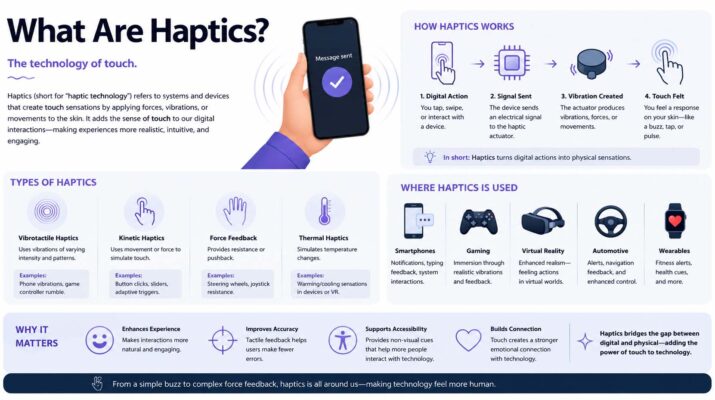
If you have ever felt a small vibration while typing, receiving a notification, or interacting with your smartphone, you have experienced haptic feedback. Many users searching for what are haptics want to understand why their devices vibrate and how this technology improves everyday interactions.
Haptics are physical sensations that electronic devices produce through vibrations, movements, or forces. These sensations help users recognize actions and notifications without relying entirely on visual or audio feedback.
For example, an iPhone may produce a gentle tap when you interact with certain controls. Similarly, gaming controllers can vibrate during action sequences to make gameplay more immersive.
Today, haptic technology appears in smartphones, smartwatches, gaming systems, vehicles, and virtual reality devices. Understanding how it works can help you customize your device settings and make better use of touch-based features.
What Are Haptics and How Do They Work?
Haptics refers to technology that creates or simulates physical sensations through touch.
In electronic devices, haptic feedback usually involves vibrations, mechanical movements, or controlled resistance. These responses provide information about an action or interaction.
For example, a smartphone may vibrate when you press a virtual keyboard key. Although the screen does not contain physical buttons, the vibration can make the interaction feel more responsive.
How Haptic Feedback Creates Touch Sensations
Most smartphones use small actuators to generate physical feedback.
An actuator converts electrical signals into mechanical movement. When software sends a command, the actuator produces a vibration or movement that the user can feel.
Different actuators can create different sensations. Some produce simple buzzing, while others generate short, precise taps.
As a result, modern devices can provide more detailed feedback than older vibration systems.
Common Types of Haptic Technology
Haptic systems generally fall into several categories:
- Vibration feedback: Creates vibrations for notifications, typing, and gaming.
- Force feedback: Applies resistance or force during interactions, often through specialized controllers.
- Tactile feedback: Produces touch sensations that simulate physical contact or surface interactions.
The technology used depends on the device and its purpose.
For example, a smartwatch may rely on subtle vibrations, while a virtual reality controller may combine vibration with other physical effects.
What Are Haptics on iPhone?
On an Apple iPhone, haptics are small physical taps or vibrations that provide feedback during certain actions.
Many compatible iPhone models use Apple’s Taptic Engine to generate controlled mechanical sensations.
Unlike traditional vibration motors that mainly produce continuous buzzing, the Taptic Engine can create short, precise feedback patterns.
Consequently, users may notice gentle taps when interacting with supported system features.
How the iPhone Taptic Engine Works
The Taptic Engine is a specialized component that generates mechanical movement.
When iOS requests haptic feedback, the component produces a physical response.
For example, certain interface interactions can trigger a short tap that confirms an action.
However, the exact behavior depends on the iPhone model, iOS version, and available settings.
Apple combines hardware and software to make these interactions feel consistent.
Similar technology appears in augmented reality applications, where physical feedback can improve interactions with digital environments.
Everyday Examples of iPhone Haptics
You may experience haptic feedback while:
- Typing on the iPhone keyboard when keyboard haptics are enabled
- Receiving calls or notifications
- Interacting with supported system controls
- Using certain accessibility features
- Playing games that support vibration feedback
- Performing specific gestures within compatible apps
Not every action produces a vibration. Instead, iOS and individual apps determine when haptic feedback is appropriate.
What Are Haptics on My iPhone Settings?
If you notice a Haptics option in your iPhone settings, it controls certain vibration and touch-feedback behaviors.
These settings allow users to customize how their devices respond to calls, alerts, and supported interactions.
For example, you may prefer vibrations when your phone is in Silent mode. Alternatively, you may want fewer physical alerts while working.
How to Change iPhone Haptic Settings
On recent iOS versions, you can generally manage system haptics through the following steps:
- Open Settings on your iPhone.
- Select Sounds & Haptics.
- Find the Haptics option.
- Choose your preferred behavior for supported calls and alerts.
- Review other vibration settings if necessary.
Depending on your iOS version, available options may include playing haptics in Ring mode, Silent mode, both, or neither.
Apple explains these controls in its official guide to changing iPhone sounds and vibrations.
Because Apple occasionally changes settings menus, the exact labels may differ between iPhone models and software versions.
How to Enable Keyboard Haptics
If you want to feel a subtle tap while typing, you can enable keyboard feedback on supported iPhones.
Follow these steps:
- Open Settings.
- Select Sounds & Haptics.
- Tap Keyboard Feedback.
- Turn on Haptic.
Once enabled, the keyboard can produce physical feedback as you type.
However, keyboard haptics may increase battery consumption. If you want to conserve battery power, consider disabling the feature.
How to Turn Off Haptics on iPhone
Some users find frequent vibrations distracting.
Fortunately, you can adjust supported haptic settings without completely changing how you use your phone.
For example, you can disable keyboard haptics while keeping vibration alerts for calls.
You can also review the Haptics setting under Sounds & Haptics to change alert behavior.
For broader vibration controls, check Settings > Accessibility > Touch > Vibration on supported iOS versions.
Be aware that turning off all vibration through Accessibility can also disable vibrations for emergency alerts.
Therefore, review the consequences before disabling vibration entirely.
Why Does My iPhone Vibrate When I Touch the Screen?
Your iPhone may vibrate during certain interactions because iOS or an app uses haptic feedback to confirm an action.
For example, keyboard feedback can create a small tap whenever you press a key.
Similarly, some system controls produce physical responses when you change a setting or interact with a supported feature.
These vibrations usually indicate normal device behavior.
Is Haptic Feedback the Same as Vibration?
Haptic feedback often uses vibration, but the two terms are not identical.
Vibration describes a physical movement. Haptic feedback describes technology that uses physical sensations to communicate information or simulate touch.
For example, a continuous vibration can alert you to an incoming call.
Meanwhile, a brief, carefully timed tap can confirm a specific action.
Therefore, vibration is one method of delivering haptic feedback.
Can Haptics Improve Accessibility?
Yes. Physical feedback can provide another way for users to recognize device interactions.
For example, vibration alerts may help someone notice a notification without relying on sound.
However, accessibility benefits depend on individual needs and device settings.
Haptics should complement other accessibility features rather than replace them entirely.
What Are iPhone Haptics Used For?
Apple uses haptic feedback to make supported interactions more informative and responsive.
Although the sensations are often subtle, they can help users recognize actions without constantly checking the screen.
Notifications and Incoming Calls
Haptic patterns can alert users to incoming calls, messages, and other supported notifications.
For example, vibrations can provide a quiet alternative to audible alerts in certain situations.
Users can customize some alert behaviors through iPhone settings.
Keyboard Typing and Navigation
Keyboard haptics can make touchscreen typing feel more tactile.
Instead of pressing physical keys, users receive a small sensation that accompanies each supported keypress.
Some navigation and interface controls also use feedback to indicate changes.
As a result, digital controls may feel more responsive.
Gaming and Interactive Applications
Mobile games can use haptic feedback to represent impacts, movements, or other gameplay events.
For example, a racing game might generate vibration during a collision.
Similarly, an action game may provide feedback when a player performs a particular move.
However, these features depend on the game’s implementation and the device’s capabilities.
The connection between hardware and software also appears in what is mechatronics?, which explains how mechanical and electronic systems work together.
Haptic Technology Beyond Smartphones
Although many people associate haptics with iPhones, the technology serves several other industries.
Different devices use physical feedback to improve control, communication, and immersion.
Gaming Controllers
Modern gaming controllers use vibration and other feedback mechanisms to communicate gameplay events.
For example, players may feel different sensations when driving across rough terrain or experiencing an explosion.
Some advanced controllers also use adaptive resistance to create more varied physical responses.
These features can make gameplay feel more interactive.
Virtual Reality and Augmented Reality
Virtual reality systems use haptic feedback to create sensations associated with digital interactions.
For example, a controller may vibrate when a player touches a virtual object.
More advanced systems can use specialized gloves or wearable devices to provide additional tactile feedback.
Developers creating these experiences often begin by studying basic coding concepts before working with interactive hardware.
Smartwatches and Wearable Devices
Smartwatches use haptic feedback for notifications, reminders, and certain navigation features.
For instance, a watch may tap your wrist to signal an incoming message.
This approach allows users to receive information without always looking at a screen.
Automotive Technology
Some vehicles use haptic feedback in steering wheels, seats, and touch controls.
For example, a steering wheel may vibrate to warn a driver about an unintended lane departure.
However, the availability and behavior of these features vary by vehicle.
Medical Training and Robotics
Specialized haptic systems can simulate physical resistance in medical training environments.
For example, training equipment may provide force feedback during simulated procedures.
Robotic systems can also use touch-related information to support controlled movements and interactions.
These applications demonstrate that haptics extends beyond simple smartphone vibrations.
Benefits of Haptic Feedback
Haptic technology offers several advantages when manufacturers implement it effectively.
Makes Digital Controls Feel Responsive
Touchscreens lack the physical movement of traditional mechanical buttons.
However, haptic feedback can provide a sensation that confirms certain interactions.
As a result, users may find supported controls more intuitive.
Provides Quiet Notifications
Vibration alerts can communicate information without requiring an audible notification.
For example, a smartwatch may provide a discreet reminder during a meeting.
Nevertheless, users should consider whether frequent vibrations become distracting.
Improves Gaming Immersion
Physical feedback can complement visual and audio effects during gameplay.
For example, vibrations may help communicate impacts or environmental changes.
However, the experience depends on how well developers design the feedback.
Supports Different Interaction Preferences
Some people prefer strong physical responses, while others prefer minimal vibration.
Customizable haptic settings allow users to choose a more comfortable experience.
Therefore, personalization is an important benefit of modern feedback systems.
Are There Any Disadvantages to Haptics?
Although haptic feedback can improve device interactions, it also has limitations.
For example, frequent vibrations may distract users who prefer quieter interactions.
In addition, certain haptic features can increase battery consumption.
The effect varies depending on the device, actuator, and frequency of use.
Some users may also find strong vibrations uncomfortable.
Fortunately, many smartphones allow users to adjust or disable specific haptic features.
If you are troubleshooting unusual device behavior, understanding what is telemetry can also help explain how connected systems collect operational information.
Likewise, learning what is a bootloader provides additional background on the software processes involved when devices start.
Frequently Asked Questions About Haptics
Should I Keep Haptics On or Off?
The best choice depends on your preferences.
If you enjoy physical confirmation while typing or navigating, keeping supported haptics enabled may improve your experience.
However, disabling unnecessary vibrations may reduce distractions and help conserve battery power.
Do Haptics Drain iPhone Battery?
Haptic feedback uses electrical power to activate physical components.
Therefore, frequent use can contribute to battery consumption.
For example, Apple notes that keyboard haptics may affect battery life.
However, the overall impact depends on how often the feature operates and other device conditions.
Why Are My iPhone Haptics Not Working?
First, check your Sounds & Haptics settings.
Next, confirm that the specific feature supports haptic feedback and that you have enabled its relevant setting.
You can also restart your device and check for available iOS updates.
If the problem continues, contact Apple Support for device-specific troubleshooting.
Are Haptics Available on Android Phones?
Yes. Many Android smartphones include vibration motors or more advanced haptic actuators.
However, the quality and customization options vary between manufacturers and models.
Can Haptics Work Without Sound?
Yes. Many devices can provide physical feedback independently of audible alerts.
For example, an iPhone can use supported vibration notifications while operating in Silent mode, depending on its settings.
Conclusion
Understanding what are haptics helps explain why modern electronic devices can communicate through physical sensations.
Haptic feedback uses vibrations, movements, or forces to make digital interactions more responsive. On iPhones, Apple’s Taptic Engine provides controlled physical feedback for supported system features and applications.
In addition, gaming controllers, smartwatches, virtual reality equipment, and vehicles use similar technology for different purposes.
Whether you prefer keyboard taps, vibration alerts, or immersive gaming feedback, knowing how haptics works allows you to customize your experience.
By reviewing your device settings, you can choose the level of physical feedback that best matches your needs.