
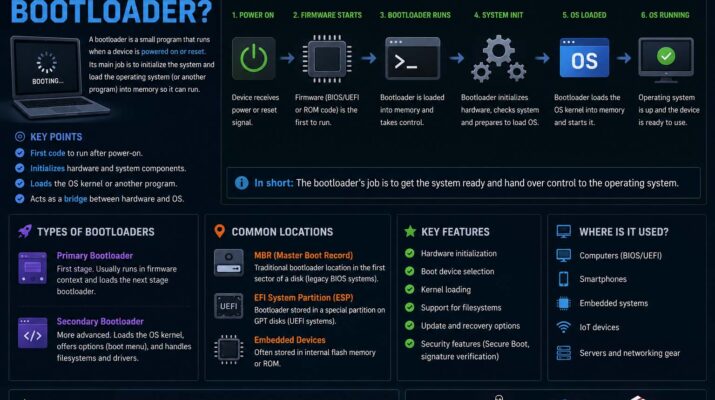
Technology users often hear the term “bootloader” when dealing with smartphones, computers, or embedded systems. Still, many people ask, what is a bootloader and why is it important? Simply put, a bootloader is a small but essential program that starts when a device powers on. Its main job is to prepare the hardware and load the operating system into memory, so the device can work correctly. Without it, a phone, computer, or microcontroller wouldn’t know how to start its software.
The bootloader acts like a bridge between the hardware and the operating system. In fact, almost every electronic device that runs software has some form of this startup program. Whether it’s a smartphone, tablet, computer, gaming console, or IoT device, this program plays a key role during startup. As a result, understanding how it works can help you troubleshoot devices, install firmware, and better understand modern tech. Learning basic coding concepts also helps beginners see how bootloaders work with software.
What Is a Bootloader in Microcontroller
One common question among electronics students and embedded developers is what is a bootloader in microcontroller systems. In a microcontroller, it is a lightweight program stored in a reserved section of memory. Thanks to it, developers can upload firmware without special programming hardware every time.
Microcontrollers run countless devices, such as home appliances, robots, industrial machines, cars, and smart gadgets. When the microcontroller powers on, this program checks the memory and decides whether to launch the main program or enter programming mode. Consequently, firmware updates become much easier and faster.
For example, popular development boards like Arduino use bootloaders to make programming simple. Instead of using a dedicated external programmer, you can connect the board by USB and upload code straight from a computer. Then, it receives the code, writes it into memory, and runs the program.
What Is a Bootloader?
Many beginners simply ask, what is a bootloader? In simple terms, it’s the first software that runs when a device turns on. Its purpose is to set up the hardware and start the operating system or main program.
How the Startup Process Works
The startup process begins the moment you press the power button. First, the processor looks for instructions in memory, and this program provides them. Next, it checks hardware such as memory, storage, the processor, and input systems to make sure everything works. Finally, once the checks pass, it loads the operating system kernel into RAM and hands over control.
Different devices use different types of bootloaders. For instance, computers commonly use GRUB or Windows Boot Manager. Meanwhile, smartphones use special bootloaders built for mobile operating systems. Similarly, embedded systems and microcontrollers often use custom bootloaders made for specific hardware.
Bootloaders can also support more than one operating system. For example, some computer users set up dual-boot systems with Linux and Windows on the same machine. In that case, it shows a menu that lets you choose which system to start. If you’re interested in hardware careers, you may also enjoy computer engineering vs computer science.
What Is a Bootloader Android
Smartphone users often search for what is a bootloader android, because Android devices offer advanced customization. On Android phones, the bootloader controls how the device starts the Android operating system. In addition, it checks system files and makes sure the software is secure before launching Android. Google’s Android bootloader overview explains this process in more detail.
Manufacturers usually lock Android bootloaders. As a result, a locked one stops users from installing unofficial operating systems or changing system files. In other words, this restriction protects device security and keeps the phone on stable, approved software.
The Android startup process has several stages. First, the device hardware starts up. Then, the startup software checks security settings and verifies the operating system image. Finally, the Android kernel loads and starts the user interface. In practice, this whole sequence takes just seconds every time the phone turns on.
Should You Unlock the Bootloader?
However, many advanced users choose to unlock the Android bootloader. For example, unlocking allows custom ROMs, modified kernels, and advanced recovery tools. Moreover, developers and enthusiasts often unlock bootloaders to gain root access, boost performance, or customize their devices.
Although unlocking offers flexibility, it also comes with risks. For one thing, some manufacturers void the warranty after unlocking. In addition, an unlocked one may lower security, since unauthorized software can get installed. Besides, users may accidentally damage system files and break the device.
If problems appear after the phone starts, guides on how to stop apps from crashing may help with software troubleshooting.
What Is a Bootloader on a Phone
Another common question is what is a bootloader on a phone. On any smartphone, whether Android or another system, the bootloader manages the startup sequence and makes sure the phone software loads properly.
When you turn on a phone, this software starts right away. First, it checks the hardware. Then, it verifies system integrity and loads the operating system into memory. Without it, the phone simply couldn’t start.
This software matters even more on phones, because they hold sensitive data such as passwords, banking apps, emails, and photos. For this reason, manufacturers build strong security features into this software. For example, secure boot systems check digital signatures and block unauthorized software changes.
On modern smartphones, this software also controls access to recovery mode and firmware updates. So, if software gets corrupted, it may still let recovery tools repair the operating system. As a result, this feature can save a device from becoming permanently unusable.
Some users confuse the bootloader with the operating system itself. However, they are completely different. The startup program only starts the system. Once Android or another operating system loads, its job is done.
Conclusion
Understanding what is a bootloader helps you appreciate the technology behind modern devices. In short, a bootloader is the core software that starts a device, prepares the hardware, and launches the operating system. From computers and smartphones to embedded systems and microcontrollers, bootloaders play a critical role.
For example, learning what is a bootloader in microcontroller systems shows how embedded devices get firmware updates. Likewise, exploring what is a bootloader android explains how Android keeps devices secure while allowing customization. Finally, understanding what is a bootloader on a phone highlights why secure startup protects your personal data.