
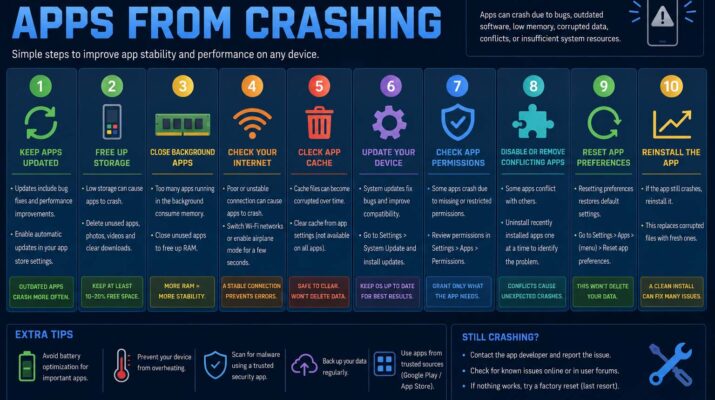
Apps crashing unexpectedly can be one of the most frustrating problems for smartphone and tablet users. Whether you are using social media, gaming applications, productivity tools, or streaming services, constant crashes interrupt your experience and may even cause data loss. Many people search online for how to stop apps from crashing because this issue affects both Android and Apple devices regularly.
Application crashes can happen for several reasons. Outdated software, corrupted files, low storage space, weak internet connections, or compatibility issues often cause apps to stop working properly. In some situations, background processes overload the device and force applications to close suddenly. Understanding the causes of app crashes is the first step toward solving the problem effectively.
Modern apps are more advanced than ever, but they also require more memory and processing power. Devices with limited storage or older operating systems may struggle to run newer applications smoothly. Understanding basic coding concepts can also help explain how applications manage temporary data and device memory. Fortunately, there are several ways to improve performance and reduce crashes without replacing your device immediately.
Restarting your device is often a helpful first step. Temporary software glitches can build up over time, and a restart clears background processes that may interfere with applications. Updating apps regularly is also important because developers frequently release bug fixes and performance improvements to solve stability issues.
How to Stop Apps From Crashing on Android
One of the most common searches online is how to stop apps from crashing on Android because Android devices come in many different brands and models. While Android offers flexibility and customization, some devices may experience performance issues if apps are outdated or incompatible with the operating system.
The first step to solving app crashes on Android is checking for updates. Open the Google Play Store and update all installed applications. Developers often release updates specifically designed to fix crashing problems and improve compatibility with newer Android versions.
Clearing the app cache can also help significantly. Cached files are temporary data stored by apps to improve speed, but over time these files may become corrupted. Clearing the cache removes damaged temporary files without deleting important personal data. Many users notice immediate improvements after performing this step.
Storage space is another major factor. Phones with nearly full storage often struggle to run applications smoothly. Deleting unnecessary files, unused apps, and old media can free up memory and improve performance. Restarting the device after cleaning storage may further enhance stability.
Android users should also keep the operating system updated. Manufacturers regularly release system updates containing security patches and bug fixes. Running outdated Android software may create compatibility problems with newer apps. Readers interested in how hardware and software work together can also explore computer engineering vs computer science.
How to Stop Apps From Crashing on Android?
People often phrase the issue differently by asking how to stop apps from crashing on Android. Although the wording changes, the solutions remain similar and focus on improving system stability and app compatibility.
A common cause of crashes involves corrupted app installations. Uninstalling and reinstalling the problematic app can replace damaged files and restore proper functionality. Before reinstalling, users should ensure they remember login details or back up important data if necessary.
Internet connectivity also plays an important role. Many modern apps rely heavily on stable internet access. Weak Wi-Fi signals or poor mobile data connections may cause apps to freeze or close unexpectedly. Switching between Wi-Fi and mobile data can help determine whether connectivity issues are responsible.
Overheating can contribute to application instability as well. Devices running too many apps at once may become hot, slowing down performance and increasing the likelihood of crashes. Closing unused apps and allowing the device to cool down can improve overall performance.
How to Stop Apps From Crashing on iPad
Apple users also frequently search for how to stop apps from crashing on iPad because even high-performance devices can experience software problems occasionally. Although iPads are generally known for stability, app crashes can still happen due to outdated software, insufficient storage, or app-related bugs.
Updating the iPad operating system is one of the most effective solutions. Apple regularly releases iPadOS updates that improve compatibility and fix system errors. Keeping both the device and applications updated helps maintain smooth performance.
Restarting the iPad can solve many temporary issues quickly. Background tasks sometimes overload the device memory, especially if many apps remain open simultaneously. Restarting refreshes the system and clears temporary glitches.
Checking storage availability is equally important for iPad users. Applications may fail to operate correctly when storage becomes too limited. Removing unused apps, deleting unnecessary photos or videos, and clearing downloaded files can help restore performance.
How to Stop Tweaked Apps From Crashing
Another topic users search for is how to stop tweaked apps from crashing. Tweaked apps are modified versions of applications that may include unlocked features, customizations, or unofficial functions. Because these apps are not always officially supported, crashes are more common compared to standard versions.
Compatibility problems are one of the main reasons tweaked apps fail. Modified apps may not work correctly after system updates because the original coding changes become incompatible with the latest operating system.
Certificates and permissions also affect tweaked app stability, especially on Apple devices. Expired certificates may prevent the app from launching properly. Reinstalling the application using updated certificates can sometimes restore functionality.
Background security systems built into Android and iOS devices may block modified apps from operating normally. Operating systems are designed to protect users from potentially unsafe software, which means tweaked apps can become unstable over time. Users interested in the startup process may also find what is a bootloader helpful for understanding how devices initialize software.
Conclusion
Learning how to stop apps from crashing can improve your overall device experience and reduce frustration caused by sudden app closures. Whether using Android phones, iPads, or modified applications, most crashes can be solved through updates, storage management, reinstalling apps, and maintaining system health.