
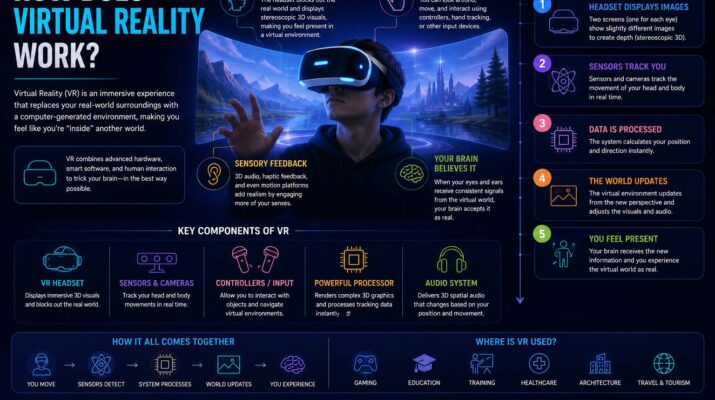
Have you ever put on a VR headset and felt like you were standing inside another world? If you’ve wondered how does virtual reality work, you’re not alone. In short, virtual reality (VR) combines sharp displays, motion tracking, sensors, smart software, and audio to build a digital world that reacts to your movements in real time.
Although the technology may seem complex, the basic idea is surprisingly simple. A VR system tricks your brain into believing you’re somewhere else. To do this, it replaces your normal view with a realistic virtual scene that changes naturally as you move.
What Is Virtual Reality and How Does It Work?
Before exploring the technology, it helps to answer the question, what is virtual reality and how does it work? The Britannica summary of virtual reality describes it as a computer-made 3D world that people can interact with.
Unlike watching a movie on a screen, VR fills your whole view and reacts instantly to your head and body movements.
A complete VR setup usually includes a headset, motion sensors, and high-resolution displays. In addition, it has an audio system, controllers or hand tracking, and software that draws the virtual world.
Together, these parts work thousands of times every second to keep the illusion alive.
While VR creates fully immersive experiences, many businesses also use augmented reality applications, which add digital content to the real world instead of replacing it.
How Does Virtual Reality Work? The Core Technology
To understand how does virtual reality work, it helps to break the process into simple steps.
First, the headset shows two images. Most VR headsets have two small screens or one screen split in half. As a result, each eye sees a slightly different picture. Then, your brain blends them into one 3D scene, just like your eyes create depth in everyday life.
Next, sensors track your movement. As you move your head, sensors inside the headset notice changes in position, rotation, direction, and speed. Immediately, the computer updates the virtual world so everything moves naturally around you. Without accurate tracking, VR would feel fake and uncomfortable.
After that, software draws the scene. A gaming PC, console, phone, or the headset’s own chip keeps building the virtual world. As your view changes, the software redraws the scene almost instantly. In fact, modern systems often show 72 to 120 frames per second to keep motion smooth and reduce motion sickness.
Finally, audio completes the illusion. Spatial or 3D audio makes sounds seem to come from certain directions. For example, if someone speaks behind your character, you’ll hear the voice from behind you.
How Does a Virtual Reality Headset Work?
Many people ask, how does a virtual reality headset work, because the headset is the heart of every VR system. In fact, it packs several technologies into one device.
| Component | Purpose |
|---|---|
| Displays | Show separate images to each eye |
| Lenses | Focus the images for comfortable viewing |
| Gyroscope | Measures head rotation |
| Accelerometer | Detects movement and speed |
| Cameras or sensors | Track position in space |
| Speakers or headphones | Produce immersive audio |
| Processor (standalone headsets) | Runs VR applications |
These parts talk to each other nonstop, so the virtual world reacts the moment you move. However, even small delays can break the feeling or cause discomfort.
Why Does VR Feel So Real?
Your brain naturally mixes signals from your eyes, ears, and inner ear to know where you are. Therefore, virtual reality carefully recreates those signals.
For example, a wide field of view, accurate tracking, and 3D images all add realism. In addition, realistic lighting, smooth animation, spatial sound, and quick controls help a lot.
As a result, when these pieces work together, your brain briefly accepts the virtual world as real.
How Does Virtual Reality Work With Phones?
Although dedicated VR headsets are now common, many people still wonder how does virtual reality work with phones. Simply put, phone-based VR uses a smartphone as both the screen and the computer.
First, the phone slides into a VR viewer. Then, the screen shows two separate images, while the phone’s motion sensors track your head. Meanwhile, lenses enlarge and focus the display. Finally, the app adjusts the images as you turn your head.
This is a cheap way to try VR. However, it usually performs worse than standalone or PC-powered headsets.
How Does Virtual Reality Motion Tracking Work?
Motion tracking is one of the most impressive parts of VR. Without it, every movement would feel cut off from the virtual world.
Modern systems use two main methods. First, inside-out tracking uses cameras on the headset to watch the room. As a result, the headset works out its own position without extra equipment. That is why many home headsets use this method, since setup is quick and easy.
Second, outside-in tracking uses sensors or cameras placed around the room to watch the headset and controllers. Because it is often extremely accurate, it is popular for professional training and high-end gaming.
How Do Virtual Reality Controllers Work?
Most VR systems let you handle objects in a natural way. For example, controllers usually have motion sensors, buttons, triggers, and thumbsticks.
However, some newer headsets skip controllers and track your hands with built-in cameras. As a result, certain apps feel even more natural.
In addition, touch feedback improves realism. So, our guide explaining what are haptics explores the technology behind vibrations and physical feedback in modern devices.
What Can You Do with Virtual Reality?
VR goes far beyond gaming. Today, many industries use it.
Gaming is still its best-known use. For example, players explore virtual worlds, solve puzzles, and play sports. In addition, they enjoy action adventures, rhythm games, and realistic simulations.
Similarly, students can explore ancient cities, run virtual science experiments, or visit places they could never reach. As a result, hands-on learning often boosts interest and memory.
Likewise, doctors use VR for surgical training and rehab exercises. Also, they use it for pain management research, mental health therapy, and anatomy lessons.
Finally, companies use VR for staff training, product demos, remote teamwork, and virtual meetings. In fact, many people who build these systems have engineering backgrounds. So, our article on what do engineers do explains the many roles behind advanced technology.
How Virtual Reality Can Work With Other Technologies
Virtual reality often works with other digital systems rather than replacing them.
For example, training programs may collect performance data that instructors review later. Similarly, our guide to what is telemetry explains how devices track and send information in real time.
Likewise, aviation, construction, and emergency teams combine VR with unmanned aircraft for planning and training. So, you may also enjoy learning what is a drone and how these machines support mapping, inspections, and training.
Advantages of Virtual Reality
VR offers several big benefits. First, it makes learning more immersive, because people often remember more when they take part instead of just reading or watching.
Second, it allows safe training. For example, pilots, surgeons, firefighters, and engineers can practice hard tasks without real-world danger.
Third, it improves teamwork, since teams in different places can meet in shared virtual rooms. Finally, VR creates games and stories that normal screens can’t easily match.
Challenges and Limitations
Despite its advantages, VR still has limits. For example, some users feel motion sickness, eye strain, or tiredness after long sessions. In addition, battery life can be short and equipment can be expensive.
Fortunately, newer hardware keeps improving display quality, comfort, and tracking.
Tips for a Better VR Experience
A few simple habits make VR more enjoyable. First, adjust the headset so it fits comfortably, and keep the lenses clean. Next, make sure you have enough room to move safely.
Also, take a break every 30 to 60 minutes and drink water. Above all, follow your headset’s safety guidelines.
In the end, most people feel more comfortable with VR after a few sessions.
Common Myths About Virtual Reality
One common myth says VR is only for gaming. In reality, education, healthcare, engineering, architecture, tourism, and business all use it widely.
Another myth says everyone gets motion sickness. However, while some people feel discomfort, many do not. Moreover, higher frame rates and better tracking have greatly reduced this problem.
Finally, some believe VR completely replaces reality. In fact, users still know they’re wearing a headset and using digital content.
Frequently Asked Questions
How does virtual reality work?
It shows a separate image to each eye and tracks your movements with sensors. Then, it updates the virtual world in real time, so you feel like you’re inside another place.
Does VR require the internet?
Not always. In fact, many VR games and apps run offline. However, online multiplayer games need a connection.
Can you wear glasses with a VR headset?
Many modern headsets fit glasses or let you adjust lens spacing. In addition, some support prescription lens inserts.
Is virtual reality safe?
For most healthy users, VR is generally safe when used as directed. Still, take regular breaks and use the headset in a clear space to lower the risk of discomfort or injury.
What’s the difference between VR and augmented reality?
VR replaces your surroundings with a digital world. In contrast, augmented reality adds digital information to the real world through a phone, tablet, or smart glasses.
The Future of Virtual Reality
Virtual reality keeps evolving as displays get sharper, chips get faster, and tracking gets more accurate. In addition, developers are working on lighter headsets, better hand and eye tracking, and richer social experiences.
As a result, VR will likely become an even bigger part of education, entertainment, healthcare, and everyday life. In the end, knowing how does virtual reality work helps you get the most from this exciting technology.