
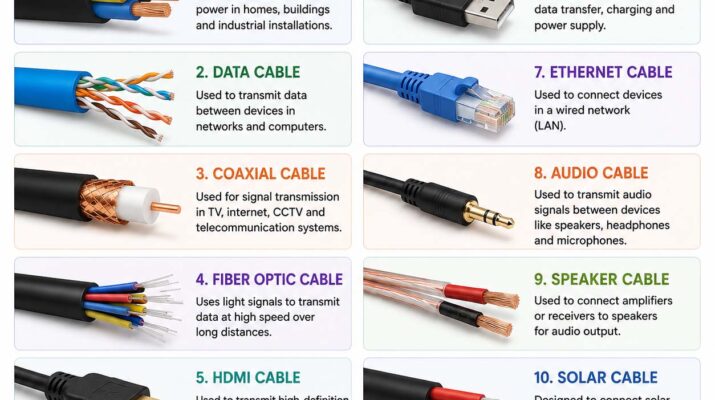
Have you ever looked behind a computer, TV, or router and wondered why there are so many types of cables? From charging a smartphone to connecting a monitor or building a home network, cables play an essential role in transferring power, data, audio, and video between devices. Choosing the right cable can improve performance, prevent compatibility issues, and help your equipment work as intended.
Although wireless technology continues to grow, wired connections remain important. In many situations, they provide faster data transfer, more stable connections, and greater reliability. Therefore, understanding common cable types makes it easier to choose the right option for your home, office, or technical project.
Types of Cables: Understanding the Main Categories
The easiest way to understand the different types of cables is to group them according to their primary purpose. For example, some carry electricity, while others transfer digital information or connect audio and video equipment.
The four main categories include:
- Power cables
- Data cables
- Audio and video cables
- Network and communication cables
Each category serves a different purpose. However, some cables can perform multiple functions, such as transferring data while supplying power.
| Cable Category | Primary Purpose | Common Examples |
|---|---|---|
| Power cables | Deliver electricity | AC power cords, DC cables |
| Data cables | Transfer digital information | USB, SATA |
| Audio and video cables | Carry sound and video signals | HDMI, DisplayPort |
| Network cables | Connect devices to networks | Ethernet, fiber optic |
Understanding these differences helps you identify the right cable before purchasing or connecting your equipment.
Power Cables and Their Common Uses
Power cables deliver electricity from a power source to electronic equipment. Depending on the device, they may carry alternating current (AC) or direct current (DC).
You’ll commonly find power cables connected to:
- Desktop computers and monitors
- Gaming consoles
- Televisions
- Home appliances
- Industrial machinery
- Chargers and electronic accessories
For example, a desktop computer typically uses an AC power cord, whereas many electronic devices rely on DC power supplied by an adapter.
However, power cables are not interchangeable in every situation. Different countries use different plug standards, and equipment requires specific voltage, current, and connector ratings. Therefore, always check the manufacturer’s specifications before replacing a cable.
In industrial systems, reliable power distribution is equally important. Equipment such as sensors and what is an actuator components depends on appropriate electrical connections to operate correctly.
Types of Data Cables for Digital Connections
Data cables transfer digital information between electronic devices. They are widely used to connect computers, smartphones, printers, storage drives, cameras, and other peripherals.
Common examples include:
- USB cables
- SATA cables
- Thunderbolt-compatible cables
- Data-capable USB-C cables
Some data cables also supply electrical power. As a result, a single connection may charge a device while transferring files.
Nevertheless, data transfer speeds vary considerably. The cable, connector, connected devices, and supported communication standards all affect performance. For this reason, checking the specifications of both devices is important before choosing a replacement.
Types of USB Cables and Connectors
USB is one of the most widely used connection standards. However, different USB connectors and cable specifications support different functions.
Types of USB-A Cables and Their Uses
USB-A is the traditional rectangular connector found on many desktop computers, laptops, chargers, and accessories.
Although newer connectors are becoming more common, USB-A remains widely used for keyboards, mice, flash drives, and other peripherals. Therefore, it is still a practical option for many everyday connections.
Types of USB-B Cables and Their Uses
USB-B connectors are often found on printers, scanners, and some professional equipment. Their larger, square-shaped design makes them easy to distinguish from other USB connectors.
Although USB-B is less common in many modern consumer devices, it remains useful for compatible office equipment.
Types of USB-C Cables and Their Uses
USB-C is a reversible connector used by many modern smartphones, tablets, laptops, and accessories. Because it can support several functions, it has become increasingly popular.
Depending on the cable and connected devices, USB-C may support:
- Charging and power delivery
- Data transfer
- External display connections
- High-speed communication
- Connections to docks and adapters
However, not every USB-C cable supports the same features. Some handle only basic charging and data transfer, while others support higher power levels or advanced display capabilities. Consequently, checking the product specifications before buying is essential.
Micro-USB Cables
Micro-USB was once a common connector for Android phones, portable electronics, and accessories. Although many newer devices have switched to USB-C, Micro-USB remains in use on some older equipment.
Lightning Cables
Lightning is Apple’s proprietary connector, historically used on compatible iPhones, iPads, and accessories. Although it is not a USB connector, Lightning cables can perform similar charging and data-transfer functions on supported devices.
Different Types of USB Cables by Standard
Connector shape is only one part of choosing a USB cable. The supported USB standard also affects transfer speed, charging capability, and compatibility.
Common USB standards include:
- USB 2.0
- USB 3.2
- USB4
Thunderbolt-compatible cables may also use USB-C connectors. However, Thunderbolt and USB are not identical standards, even though some versions share connector types.
For reliable information about USB specifications, consult the official USB Implementers Forum website.
In addition, check the cable packaging or manufacturer’s product page before buying. Two cables may look identical but support different transfer speeds and power levels. Therefore, the connector alone does not tell you everything about a cable’s capabilities.
Types of HDMI Cables for Video and Entertainment
HDMI carries digital audio and video between compatible devices. It is commonly used with televisions, monitors, gaming consoles, streaming devices, and projectors.
Different HDMI cable categories support different bandwidth requirements. Consequently, the best option depends on your display, source device, and intended resolution.
Standard HDMI Cables
Standard HDMI cables are intended for basic audio and video connections. They may be suitable for older equipment and lower-bandwidth applications, depending on their specifications.
High-Speed HDMI Cables
High-Speed HDMI cables support higher bandwidth than standard cables. They are often used with Full HD equipment and some 4K setups, depending on the specific cable rating.
Premium High-Speed HDMI Cables
Premium High-Speed HDMI cables are designed for demanding video applications, including supported 4K formats and HDR features.
Ultra High-Speed HDMI Cables
Ultra High-Speed HDMI cables support the bandwidth needed for advanced applications, including compatible 4K and 8K formats, high refresh rates, and modern gaming features.
However, buying an expensive cable does not automatically improve picture quality. Instead, the cable must meet the requirements of your source device, display, resolution, refresh rate, and other features.
Types of Charging Cables for Modern Devices
Different electronics require different types of charging cables. The correct option depends on the device’s connector, charging system, and supported power level.
Common charging cable options include:
- USB-C charging cables
- Lightning charging cables
- Micro-USB charging cables
- Magnetic charging cables
- Laptop charging cables
- Proprietary charging cables
Some cables support fast charging, while others offer lower power limits. In addition, the wall adapter or charging port must support the required charging standard.
Therefore, replacing a cable alone will not always increase charging speed. Check the cable, charger, and device specifications together to ensure compatibility and avoid buying an unsuitable accessory.
Ethernet Cables for Wired Networking
Ethernet cables connect computers, routers, switches, servers, and other devices to local networks. They remain popular because wired connections can provide consistent performance and low latency.
Common Ethernet cable categories include:
- Cat5e
- Cat6
- Cat6a
- Cat7
- Cat8
These categories differ in their supported frequencies, shielding options, and performance specifications. Generally, higher-category cables can support greater bandwidth in suitable configurations. However, actual network speed also depends on the connected equipment and cable length.
For example, Ethernet is often preferred for online gaming, business networks, and servers because a wired connection avoids many interference issues that can affect Wi-Fi. As a result, it can provide a more consistent connection in environments where reliability matters.
Fiber Optic Cables for High-Speed Communication
Fiber optic cables transmit information using pulses of light rather than electrical signals. As a result, they are especially useful for high-speed communication over long distances.
Their main advantages include:
- High data capacity
- Long transmission distances
- Resistance to electromagnetic interference
- Reliable communication for large networks
Fiber optic technology is widely used by internet service providers, telecommunications companies, cloud data centers, and large businesses.
Although installation and compatible equipment can cost more than traditional copper wiring, fiber is an excellent option for demanding network applications. Moreover, it can support communication over distances that are challenging for many copper connections.
Coaxial Cables and Their Applications
Coaxial cables carry radio frequency signals and have been used for decades in television, telecommunications, and other electronic systems.
Their layered construction helps protect signals from external interference. Consequently, coaxial cables remain useful in many residential and commercial installations.
Common applications include:
- Cable television
- Satellite receivers
- Cable internet modems
- Security camera systems
- Radio frequency equipment
Although fiber and Ethernet have become more common for some applications, coaxial cables remain valuable wherever compatible equipment requires them. Therefore, it is worth checking the ports on your existing equipment before replacing a coaxial connection with another cable type.
Audio and Video Cable Types for Different Devices
Not every device uses HDMI. Depending on the equipment, you may need a different cable to connect a display, speaker, television, or audio system.
Common examples include:
- DisplayPort: Used for many computer monitors and high-performance display setups.
- VGA: An older analog video connection found on legacy displays.
- DVI: A video interface used by some older computer hardware.
- RCA: A connector type commonly associated with analog audio and video.
- 3.5 mm audio: Used with many headphones, speakers, and audio accessories.
- Optical audio (TOSLINK): Carries digital audio signals between compatible devices.
Because these connectors serve different purposes, check the available ports on your equipment before purchasing a cable. If your devices use different connection types, you may need a compatible adapter or converter. However, remember that not every adapter supports all resolutions, refresh rates, or audio formats.
Specialty Cables for Industrial and Outdoor Use
Some applications require cables designed for demanding environments. These cables may need additional insulation, shielding, flexibility, or resistance to heat and moisture.
Examples include:
- Industrial control cables
- Marine cables
- Automotive wiring harnesses
- Solar panel cables
- Fire-resistant cables
- Underground electrical cables
For instance, outdoor cables may require protection against sunlight and moisture. Similarly, industrial cables may need shielding to reduce interference from nearby electrical equipment.
In industrial automation, cable connections often carry signals between sensors, controllers, and other devices. For additional background on how machines collect and transmit operational information, read what is telemetry.
How to Choose the Right Type of Cable
With so many options available, selecting a suitable cable becomes easier when you focus on your equipment and intended use. Before making a purchase, consider the following questions:
- Which devices am I connecting?
- Does the cable need to carry power, data, audio, or video?
- Which connector type does each device use?
- What length do I need?
- What data speed, resolution, or power rating is required?
- Will I use the cable indoors or outdoors?
For example, connecting a laptop to a monitor requires checking both the connector and the display features supported by the cable. Similarly, charging a laptop may require a cable rated for the necessary power level.
Additionally, review your device manual or manufacturer’s website before making a purchase. This simple step can prevent compatibility issues and unnecessary spending. If you’re learning technical fundamentals, basic coding concepts can also help you build a foundation for understanding how digital systems process information.
Common Cable Mistakes to Avoid
Connection problems often occur because people choose an unsuitable cable rather than because their device is faulty. Fortunately, many of these problems are easy to prevent.
Watch out for these common mistakes:
- Assuming all USB-C cables have identical capabilities
- Buying HDMI cables without checking bandwidth requirements
- Choosing a cable that is unnecessarily long
- Using damaged or frayed cables
- Ignoring charging and power ratings
- Connecting incompatible ports without the correct adapter
- Using indoor cables in environments that require outdoor-rated products
To avoid these issues, check the cable specifications, inspect its condition, and confirm that it meets your equipment’s requirements before connecting it. If a cable becomes unusually hot, develops exposed wires, or shows damaged insulation, stop using it and replace it with a suitable product.
Tips for Making Cables Last Longer
Proper care can extend a cable’s lifespan and reduce the risk of connection problems. Although cables are designed for everyday use, repeated bending, pulling, and exposure to heat can cause damage over time.
Follow these practical tips:
- Avoid bending cables sharply.
- Pull connectors out by their plugs rather than yanking the cable.
- Keep cables away from excessive heat.
- Store unused cables in loose coils.
- Protect outdoor cables from moisture and sunlight when required.
- Replace cables with exposed wires or damaged insulation.
- Organize cables to prevent tangling and accidental pulling.
In addition, use appropriate cable clips or organizers to reduce clutter. Good cable management makes a workspace safer and helps you identify connections more easily. As a result, you can also spot damaged or disconnected cables sooner.
Why Understanding Cable Types Matters
Understanding cable types is useful for home users, students, gamers, technicians, and IT professionals. It helps you select compatible accessories, troubleshoot connection problems, and avoid buying equipment that cannot deliver the performance you expect.
Professionals in engineering, networking, manufacturing, and electronics rely on cable knowledge every day. If you’re curious about technical careers, what do engineers do provides a broader look at how engineers solve practical problems involving electrical and mechanical systems.
Similarly, industrial facilities often document cable routes and instrument connections using technical drawings. A guide to p&id meaning can help you understand how these diagrams represent equipment, piping, and signal connections.
Frequently Asked Questions About Types of Cables
What Are the Most Common Types of Cables?
Common cable types include power cables, USB cables, HDMI cables, Ethernet cables, fiber optic cables, coaxial cables, and audio cables. Each serves a different purpose, so the right option depends on the devices you want to connect.
Are All USB-C Cables the Same?
No. Although USB-C cables use the same connector shape, they may support different data speeds, power levels, and video features. Therefore, check the manufacturer’s specifications before purchasing one.
Which HDMI Cable Should I Buy?
Choose an HDMI cable based on the resolution, refresh rate, and features supported by your equipment. For demanding 4K, 8K, HDR, or high-refresh-rate setups, verify the required cable category and bandwidth before buying.
Can One Cable Handle Charging and Data Transfer?
Yes. Many USB cables, including compatible USB-C cables, support both charging and data transfer. However, the available features and performance depend on the cable’s specifications and the connected devices.
Does Cable Length Affect Performance?
It can. Longer cables may experience signal loss or reduced performance, especially in high-speed data and video applications. Therefore, choose a cable that is long enough for your setup without adding unnecessary length.
When Should I Replace a Cable?
Replace a cable if you notice exposed wires, damaged insulation, loose connectors, intermittent connections, or other visible damage. In particular, stop using a damaged power cable because it may create an electrical or fire hazard.
Choosing the Right Cable with Confidence
Understanding the different types of cables makes it easier to connect devices correctly, improve performance, and avoid compatibility issues. Whether you’re comparing USB cables for a laptop, choosing HDMI cables for a home theater, or selecting charging cables for mobile devices, matching the cable to your equipment is essential.
Before purchasing a cable, check its connector type, supported standards, power requirements, and intended use. Additionally, consider the environment where you’ll use it and whether the cable meets the necessary safety ratings.
With a little research, you can choose suitable cables, avoid unnecessary expenses, and keep your devices working reliably.