
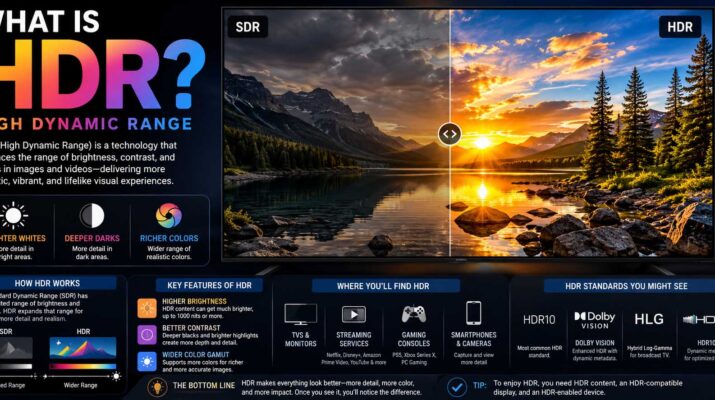
If you have bought a TV, changed your phone camera settings, or adjusted a modern game, you have probably seen the term HDR. So, what is HDR exactly? stands for High Dynamic Range, a technology designed to reproduce a wider range of brightness, contrast, and color than standard imaging methods. In simple terms, HDR can preserve bright highlights while keeping darker areas detailed instead of turning them completely white or black.
However, does not refer to one single technology. Photography uses by combining different exposures, while TVs and monitors use -compatible content and display technology. Meanwhile, games can render scenes with a wider brightness range when both the software and display support it.
Understanding these differences makes it much easier to decide when is useful and how to get the best results.
What Is HDR and How Does It Work?
Dynamic range describes the difference between the darkest and brightest details an imaging system can capture, process, or display.
For example, imagine taking a photo from inside a room while a sunny garden is visible through the window. A conventional exposure might correctly show the room but make the window extremely bright. Alternatively, exposing for the outdoor scene might leave the room too dark.
HDR aims to preserve more information at both ends of that brightness range.
However, the exact process depends on the device. Cameras may combine several exposures, while video stores and delivers brightness and color information that compatible displays can reproduce.
As a result, well-produced can make bright sunlight, reflections, flames, clouds, shadows, and other difficult scenes appear more realistic.
What Is HDR Photography?
What is HDR photography is slightly different from on a television.
In photography, traditionally involves capturing multiple versions of the same scene at different exposure levels. Software then combines useful information from those exposures into one image.
For instance, a photographer might capture:
- One darker exposure for bright highlights
- One normal exposure for midtones
- One brighter exposure for shadow detail
The software merges those images while trying to preserve details throughout the scene.
This approach developed from a long history of photographic experimentation. If you are interested in how imaging technology reached today’s computational photography era, when were cameras invented provides useful historical context for how camera systems evolved.
Modern smartphones have made the process far easier. Instead of asking the user to manually capture several photographs, phones can rapidly capture and process multiple frames automatically.
Therefore, you may use photography every day without realizing it.
When HDR Photography Works Best
HDR performs particularly well when a scene contains extreme differences between light and dark areas.
Landscape photography is a common example. A bright sky and darker foreground can be difficult to expose correctly in one traditional shot. processing can preserve cloud detail while making trees, buildings, or mountains easier to see.
Backlit portraits can also benefit. Likewise, interiors with bright windows often become more balanced with HDR.
However, is not always ideal. Moving people, vehicles, animals, leaves, or waves can change position between exposures and potentially create artifacts. Modern computational photography reduces this problem, although results still depend on the device and processing software.
What Is HDR in Camera Settings?
If you are asking what is HDR in camera menus, the setting usually tells the camera or smartphone to preserve a wider range of highlight and shadow detail.
On many phones, the feature works automatically. The device analyzes the scene, captures several frames or exposure levels, aligns them, and processes them into one finished photograph.
Therefore, you often do not need to manually control each exposure.
Some cameras also provide modes with adjustable exposure differences. Meanwhile, experienced photographers may shoot bracketed RAW images and combine them later using editing software for greater control.
HDR also affects how people find and evaluate visual content online. For instance, effective Image search techniques become useful when comparing HDR examples, reference photography, display demonstrations, and other visual material.
Still, cannot repair every photograph. Poor focus, severe motion blur, bad composition, or an extremely underexposed image will not automatically become excellent simply because processing is active.
What Is HDR TV Technology?
When someone asks what is HDR TV, they are usually referring to a television capable of displaying video.
Traditional SDR, or Standard Dynamic Range, uses a more limited brightness and color range. content, by contrast, can carry information intended for brighter highlights, greater shadow detail, and a broader range of colors.
However, simply seeing “HDR” on a television specification sheet does not guarantee outstanding picture quality.
The display still needs sufficient brightness, good contrast, effective local dimming or strong per-pixel control, and accurate color reproduction to create convincing HDR.
For that reason, two -compatible televisions can produce noticeably different results.
Common HDR Formats
Several HDR formats are used across TVs, streaming services, game consoles, discs, and other devices.
| HDR Format | Main Characteristic | Common Use |
|---|---|---|
| HDR10 | Open, widely supported HDR format | TVs, games, streaming, discs |
| HDR10+ | Uses dynamic metadata | Compatible TVs and streaming content |
| Dolby Vision | Uses dynamic metadata and a managed HDR ecosystem | TVs, streaming, movies |
| HLG | Designed with broadcast compatibility in mind | Live and broadcast television |
HDR10 is especially common because a wide range of displays and devices support it.
Dynamic-metadata formats can provide scene-by-scene or frame-related guidance to compatible displays. As a result, the TV can adapt tone mapping more precisely than when relying only on static information for an entire program.
HDR vs SDR: What’s the Difference?
The biggest difference between and SDR is not simply brightness.
Instead, HDR gives compatible content and hardware more room to represent differences between dark and bright areas while supporting richer color reproduction.
Here is a simple comparison:
| Feature | SDR | HDR |
|---|---|---|
| Dynamic range | More limited | Wider potential range |
| Bright highlights | More restricted | Can appear more intense |
| Shadow detail | More limited | Can preserve more detail |
| Color capability | Traditional range | Often supports wider color gamuts |
| Hardware requirements | Works on standard displays | Needs compatible hardware for full benefit |
| Content support | Extremely common | Requires HDR-compatible content |
Still, good SDR can look better than poorly implemented HDR.
Therefore, picture quality depends on the content, display hardware, calibration, viewing environment, and processing rather than the label alone.
What Is HDR Gaming?
What is HDR gaming refers to games rendered and displayed with High Dynamic Range output.
When implemented correctly, can make games more visually convincing. Bright explosions can stand out against dark environments, sunlight can look more intense, and nighttime scenes can preserve details without making everything gray.
However, three parts usually need to work together: the game, the gaming device or computer, and the display.
If one part does not properly support , the result may be SDR or an incorrectly mapped image.
Many modern games also provide calibration controls. Therefore, players may need to adjust peak brightness, paper-white brightness, black level, or similar settings.
Incorrect calibration can make an game look washed out, overly dark, or unnaturally bright.
HDR and Immersive Display Technology
HDR becomes particularly interesting when combined with immersive technologies.
For example, augmented reality applications place digital content into views of the physical world. As display hardware improves, brightness, color, contrast, and realistic rendering become increasingly relevant to making those digital elements feel visually consistent with their surroundings.
Virtual reality creates a different challenge because displays sit extremely close to the user’s eyes. Therefore, contrast, black levels, brightness, latency, resolution, and display response can strongly influence the experience.
Understanding how does virtual reality work can help explain why display characteristics matter so much in immersive systems.
HDR is only one part of that equation, but improved dynamic range can contribute to more convincing lighting and visual depth when hardware and software support it correctly.
Why Does HDR Sometimes Look Washed Out?
HDR should improve picture quality, yet users sometimes enable it and immediately notice dull colors, gray blacks, or strange brightness.
Usually, this happens because something in the signal chain is configured incorrectly.
For example, the display may have switched into an unsuitable picture mode. Likewise, the operating system may be sending output while SDR applications are being displayed through conversion.
Incorrect black levels, brightness settings, or tone mapping can also cause poor results.
If HDR looks wrong, try this quick troubleshooting process:
- Confirm that your TV or monitor genuinely supports HDR.
- Check whether the movie, game, or application provides HDR output.
- Make sure HDR is enabled on the correct HDMI input when required.
- Check the console, PC, or streaming device’s HDR settings.
- Use the display’s HDR picture mode rather than copying SDR settings.
- Run the platform’s HDR calibration tool if one is available.
- Compare and SDR using actual content rather than an ordinary SDR image.
If HDR still looks consistently worse, the display itself may have limited capabilities.
Do You Need a Special HDMI Cable for HDR?
HDR video can require significant bandwidth, particularly when combined with high resolutions, high refresh rates, and advanced color formats.
However, buying a cable simply because its packaging says “HDR cable” is not the best approach.
Instead, match the cable to the HDMI bandwidth requirements of your devices. For example, modern 4K gaming at high refresh rates may require greater bandwidth than basic 4K video.
Your television, console, receiver, and cable must also support the desired signal configuration.
Therefore, when troubleshooting missing , check the entire connection path rather than assuming the TV is responsible.
Is HDR Always Better?
Not necessarily.
High-quality displayed on capable hardware can look spectacular. However, poorly mastered content or a display with weak brightness and contrast may offer only a small improvement.
Likewise, some users prefer SDR in bright desktop environments because behavior can vary between operating systems, monitors, browsers, and applications.
Personal preference matters too. Technology improvements do not always mean everyone prefers the newer presentation. A similar idea appears in discussions about why does vinyl sound better, where technical specifications and subjective experience do not always lead people to the same preference.
Therefore, use the mode that produces the most accurate and comfortable result for your setup.
FAQs About HDR
Does HDR Mean 4K?
No. HDR and 4K describe different characteristics.
4K primarily refers to image resolution, while refers to brightness, contrast, color, and dynamic-range capabilities. Therefore, a display can support 4K without delivering strong performance.
Should I Leave HDR On All the Time?
That depends on your device.
Televisions generally switch into mode automatically when content starts. On computers, however, leaving system-wide enabled may affect how SDR applications appear.
Therefore, use automatic switching when available and adjust settings based on your display and operating system.
Does HDR Improve Every Photo?
No. HDR is most useful when a scene contains a large difference between its brightest and darkest areas.
For simple, evenly lit scenes, standard processing may already capture everything you need.
Is HDR Good for Gaming?
Yes, provided the game implements properly and your display can reproduce it effectively. Correct calibration also matters because poor settings can make an HDR game look worse than SDR.
Getting the Best Experience From HDR
Understanding what is HDR becomes easier once you stop thinking of it as a simple “better picture” switch. Instead, High Dynamic Range is a collection of imaging techniques designed to preserve and reproduce a broader range of brightness, contrast, and color.
In photography, can combine exposures or computationally process multiple frames to retain highlight and shadow detail. Meanwhile, televisions use compatible video signals and display technology to create more realistic highlights and richer images. In gaming, can make lighting and environments more convincing when the game, hardware, display, and settings all work together.
Therefore, before judging , use genuine content, confirm that every device in the signal chain supports the required format, and calibrate your display correctly. When those pieces line up, can provide one of the most noticeable improvements in modern image quality.