
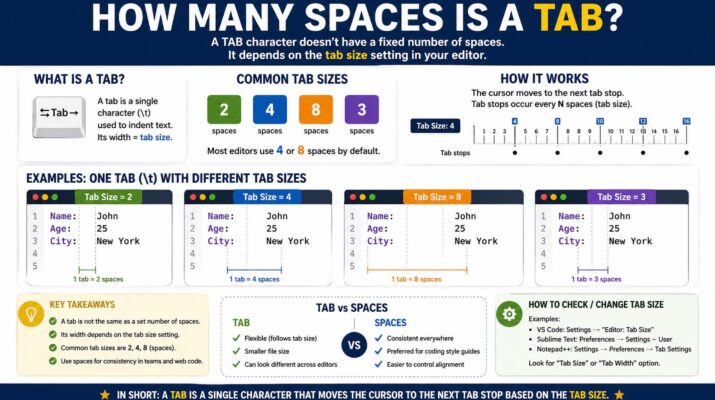
The question how many spaces is a tab is more common than many people realize. Whether you format a school paper, edit a business report, or write computer code, indentation affects how your text looks. However, the Tab key does not always create the same amount of room. Instead, its width depends on the software, the settings, and the purpose.
In simple terms, the Tab key moves the cursor forward to a preset position. Many programs set this position at four or eight characters by default. Still, most word processors and code editors let you change it. As a result, knowing how it works helps you create cleaner documents and better-aligned text.
Why Tabs and Spaces Matter
Tabs and spaces may look alike, but they work differently. The spacebar adds one blank character each time you press it. In contrast, the Tab key jumps the cursor to the next tab stop. Therefore, one press can replace several spacebar presses.
For example, if tab stops sit every four characters, one press moves the cursor as far as four spacebar taps. Other programs place tab stops every eight characters. Because of this, there is no single universal answer.
Tabs are useful because they keep alignment consistent. On the other hand, text lined up by hand may shift when fonts or margins change. Tab stops, meanwhile, stay at fixed positions.
How Many Spaces Is a Tab in Word
Many people ask how many spaces is a tab in word since Word is so common for essays and resumes. In Word, the default tab stop sits at 0.5 inches, not at a fixed character count. As a result, the visible width depends on your font.
For instance, with Times New Roman at size 12, a half-inch indent looks like roughly five characters. However, if you change the font or size, that look changes too.
Word also lets you customize tab stops. You can open the Paragraph settings and add left, right, center, or decimal stops. That is why Word is more precise than simply counting characters.
How Many Spaces Is a Tab on Google Docs
Another common question is how many spaces is a tab on google docs. Google Docs is popular for online teamwork, school assignments, and shared files. By default, pressing Tab there creates an indent of about 0.5 inches, just like Word.
Visually, this often looks like four or five characters, depending on font style and size. This is because Docs uses proportional fonts, where each letter has a different width.
Google Docs also lets you adjust indentation with the ruler at the top of the page. So, it is better to think in margins and positions rather than character counts.
How Many Spaces Is a Tab Indent
When people ask about a tab indent, they usually mean paragraph indentation or code formatting. For writing, a paragraph indent is often half an inch. Meanwhile, in coding, one indent level commonly equals four characters.
Many programming style guides prefer spaces over tabs to keep code consistent across editors. For example, the official PEP 8 style guide for Python recommends four spaces per indentation level. Other editors may show each indent as two, four, or eight characters wide.
In short, the right indent depends on context. Writing documents often use a half-inch indent, while code editors commonly use four characters. Similarly, older terminals often use eight. Finally, many tools let you pick your own size.
Tabs vs Spaces in Coding
The tabs versus spaces debate is famous among programmers. Some developers prefer tabs because they need fewer keystrokes and each user can resize them. On the other hand, others prefer spaces since the layout stays identical everywhere.
For instance, one editor may show an indent four characters wide while another shows eight. In that case, code alignment may break. Consequently, many teams choose spaces for reliability.
Even so, tabs remain useful in many editors. Indeed, if your team agrees on settings, tabs can save time and improve accessibility.
Formatting is an important part of learning programming. Therefore, developers who study basic coding concepts build a stronger base for writing and organizing clean code.
How to Check Tab Size in Different Programs
If you are unsure about the width, the best solution is to check your software settings. Fortunately, most programs allow customization.
Microsoft Word keeps this option in the paragraph or tabs settings. Likewise, Google Docs uses the ruler tool. Code editors like VS Code or Sublime Text, however, keep it under indentation settings. There, you may see options such as tab size 2, tab size 4, or convert indentation to spaces.
Best Practices for Writers
For essays, business documents, and reports, use the Tab key or paragraph indent tools. In other words, avoid pressing the spacebar many times. This way, your formatting stays consistent even if fonts or page sizes change.
Also, when a teacher or employer asks for a first-line indent, use the paragraph formatting option. As a result, your document looks cleaner and needs less editing.
Best Practices for Developers
For developers, consistency matters more than the choice itself. For example, if your project uses four-character indents with the spacebar style, keep using that. Likewise, when the team uses tabs set to size four, match that style.
Moreover, modern code editors can convert one style to the other automatically. So, turn on these tools to keep your code clean.
Final Answer: How Many Spaces Is a Tab?
So, how many spaces is a tab? The honest answer is that it depends. Many code editors use a width of four characters. However, older systems often use eight. Finally, Word and Google Docs usually use a half-inch indent rather than a fixed character count.