
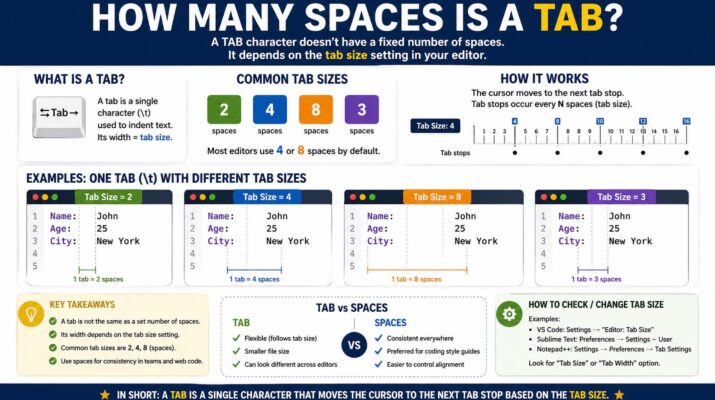
The question how many spaces is a tab is more common than many people realize. Whether you are formatting a school paper, editing a business report, or writing computer code, tabs and spaces affect how text appears on the page. Many users assume a tab key always creates the same amount of spacing, but the truth is more flexible. A tab can represent different numbers of spaces depending on the software, settings, and purpose.
In simple terms, a tab is a formatting tool used to move the cursor forward to a preset position. In many programs, one tab equals four or eight spaces by default. However, some word processors and coding editors allow users to customize this amount. Understanding how many spaces is a tab can help you create cleaner documents, align text properly, and improve readability.
Why Tabs and Spaces Matter
Tabs and spaces may look similar, but they function differently. A spacebar inserts one single blank character each time you press it. A tab key moves the cursor forward to the next tab stop. This means one press of the tab key can replace several spacebar presses.
For example, if a tab stop is set every four , pressing once moves the cursor the same distance as pressing the spacebar four times. In other programs, the tab stop may be set to eight . Because of this variation, there is no single universal answer to how many spaces is a tab.
Tabs are useful because they keep alignment consistent. If you manually use spaces, lines may shift when fonts or margins change. Tabs automatically adjust to preset positions.
How Many Spaces Is a Tab in Word
Many people ask how many is a tab in word because Microsoft Word is widely used for essays, resumes, and office documents. In Word, the default tab stop is usually set at 0.5 inches rather than a fixed number of spaces. This means the visible spacing depends on the font you are using.
For common fonts like Times New Roman size 12, a half-inch tab often looks similar to around five spaces. However, if you change fonts or font sizes, the number of visible spaces changes too.
Microsoft Word also allows users to customize tab stops. You can open the Paragraph settings and define left tabs, right tabs, center tabs, or decimal tabs. This makes Word more precise than simply counting spaces.
How Many Spaces Is a Tab on Google Docs
Another common question is how many spaces is a tab on google docs. Google Docs is popular for online collaboration, school assignments, and shared work documents. By default, pressing the Tab key in Google Docs often creates a standard indent equal to about 0.5 inches, similar to Word.
In practical appearance, this often looks like four to five spaces depending on font style and size. Since Docs uses proportional fonts by default, characters have different widths, so measuring exact spaces visually can vary.
Google Docs also lets users adjust indentation through the ruler at the top of the page. Instead of thinking only in spaces, it is better to think in margins and alignment positions.
How Many Spaces Is a Tab Indent
When users ask how many spaces is a tab indent, they are usually referring to paragraph indentation or code formatting. In writing, a paragraph indent is often half an inch. In coding, a tab indent commonly equals four spaces.
Many programming languages and style guides recommend replacing tabs with spaces to keep formatting consistent across editors. For example, Python developers often use four spaces for each indentation level. Other coding environments may display a tab as two, four, or eight spaces.
This means a tab indent depends heavily on context:
Writing documents: often 0.5 inch indent
Coding editors: commonly four spaces
Older terminals: often eight spaces
Custom settings: user-defined
Tabs vs Spaces in Coding
The debate between tabs and spaces is famous in programming communities. Some developers prefer tabs because they require fewer keystrokes and can be resized by each user. Others prefer spaces because spacing remains identical across systems.
If one editor treats a tab as four spaces and another treats it as eight, code alignment may break. This is why many teams choose spaces for reliability.
Still, tabs remain useful in many editors. If your team agrees on settings, tabs can save time and improve accessibility.
How to Check Tab Size in Different Programs
If you are unsure how many spaces is a tab, the best solution is to check the software settings. Most programs allow customization.
In Microsoft Word, open paragraph or tabs settings. In Google Docs, use the ruler tool. In code editors like VS Code or Sublime Text, look for indentation settings. You may see options such as tab size 2, tab size 4, or convert tabs to spaces.
Best Practices for Writers
For essays, business documents, and reports, use tabs or paragraph indentation tools instead of manually pressing the spacebar many times. This keeps your formatting consistent even if fonts or page sizes change.
If your teacher or employer requests a first-line indent, use the paragraph formatting option rather than spaces. This looks cleaner and saves editing time.
Best Practices for Developers
For developers, consistency matters more than whether you choose tabs or spaces. If your project uses four spaces, keep using four spaces. If the team uses tabs with size four, match that style.
Modern code editors can automatically convert tabs to spaces or vice versa. Enable these tools to keep code clean..
Final Answer: How Many Spaces Is a Tab?
So, how many spaces is a tab? The honest answer is that it depends. In many coding editors, one tab equals four spaces. In older systems, it may equal eight spaces. In Word and Google Docs, a tab usually represents a half-inch indent rather than a fixed number of spaces.