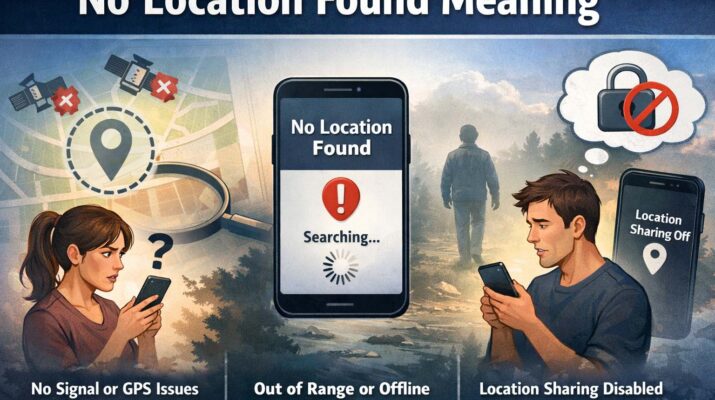
If you have ever tried to track a device, share your location, or use a map application, you may have seen the message no location found meaning appear on your screen. This notification can be confusing, especially when you need accurate location information quickly. Many users encounter this issue while using Apple Find My, Google Maps, or other location-sharing apps. The message does not always mean something is wrong permanently. In most cases, it points to a temporary connection, permission, or settings issue.
Understanding the no location found meaning can help you fix the problem fast and restore accurate tracking. Whether you are trying to locate your own phone, check a family member’s location, or monitor a lost device, knowing why this message appears is important. In this guide, we will explain common causes, possible solutions, and ways to prevent it from happening again.
What Is the Meaning of No Location Found?
The phrase no location found meaning usually indicates that a device cannot currently share or update its live location. It means the app or service trying to access the location data is unable to retrieve the current position of the device.
This can happen for several reasons:
- The device is turned off
- Internet is disconnected
- GPS signal is weak
- Location services are disabled
- App permissions are restricted
- Software glitches are present
In simple terms, it means the system cannot detect where the device is right now.
What Does No Location Found Mean?
Many people ask what does no location found mean when checking shared locations on iPhone or Android devices. The message means the device cannot communicate its position to the app requesting the data.
For example, if someone shares their location with you through Find My iPhone and their phone loses internet connection, the app may display this message. It does not always mean they stopped sharing intentionally. Often, it is caused by technical issues rather than user action.
Another common question is what does it mean when it says no location found while using location-sharing apps. It generally means one of these situations:
- The phone battery is dead
- Airplane mode is enabled
- Mobile data or Wi-Fi is unavailable
- The device is in an area with no signal
- The app is not allowed to access GPS
So, when the message appears, it usually means the device cannot send its current coordinates.
Common Reasons for No Location Found Meaning
1. Internet Connection Problems
Most location services need an active internet connection. If Wi-Fi or mobile data is unavailable, the device may fail to send location updates.
2. GPS Signal Blocked
GPS works best outdoors. Thick walls, underground parking garages, elevators, and tunnels may block satellite signals.
3. Disabled Location Services
If location settings are turned off, apps cannot access the device’s position.
4. Device Powered Off
A turned-off phone cannot share live location.
5. Outdated Software
Old operating systems or app versions sometimes create bugs that stop location updates.
Apple users often ask what does no location found mean on iphone because this message commonly appears in Find My. On iPhone, it usually means Find My cannot receive updated location data from the selected device.
Possible causes include:
- Find My disabled
- iPhone battery dead
- No Wi-Fi or cellular data
- Location Services turned off
- Device switched off
- Apple server delay
If the iPhone reconnects later, the location may update automatically.
No Location Found vs Location Not Available
Many users confuse these two messages. They are similar but slightly different.
No Location Found
Usually means the app cannot determine or retrieve the current position right now.
Location Not Available
Often means the device cannot be reached or location sharing is intentionally disabled.
Knowing the difference helps better understand the no location found meaning and what action to take next.
What Does No Location Found Off Network Mean?
Some users ask what does no location found off network mean when devices are disconnected from Wi-Fi or cellular service. This message usually means the phone is not connected to any network, so it cannot transmit location data.
When a device is off network, it may be:
- In airplane mode
- Out of signal range
- Without SIM service
- Wi-Fi turned off
- In remote areas
Without network access, many apps cannot refresh live locations.
No Location Found Off Network Meaning
The phrase no location found off network meaning is closely tied to internet or cellular connectivity. It tells users that location sharing cannot work because the device is not online.
Even if GPS can estimate location, some apps still need data service to send coordinates to others. This is why the message appears frequently during travel, in rural zones, or inside buildings with poor reception.
How to Fix No Location Found Meaning
If you keep seeing this notification, try these simple solutions.
Check Internet Connection
Turn Wi-Fi on or enable mobile data. Restart the connection if needed.
Enable Location Services
Go to settings and allow location access for the app.
Restart the Device
A quick restart can fix temporary bugs.
Update Software
Install the latest iOS, Android, or app updates.
Charge the Battery
Low battery mode may restrict background location sharing.
Disable Airplane Mode
Airplane mode stops network communication.
Fixing No Location Found on iPhone
If you see the issue on Apple devices:
- Open Settings
- Tap Privacy & Security
- Select Location Services
- Ensure it is turned on
- Open Find My settings
- Confirm Share My Location is enabled
This often solves what does no location found mean on iphone issues quickly.
Can Someone Fake No Location Found?
Some users wonder if people intentionally trigger this message. In some cases, yes. A person may disable location services, turn off their phone, or enable airplane mode. However, technical problems are far more common than deliberate actions.
So before assuming someone is hiding location, first consider normal connectivity or settings issues.
How to Prevent No Location Found Errors
To reduce future problems:
- Keep phone software updated
- Maintain battery charge
- Leave location services enabled
- Use reliable Wi-Fi or mobile data
- Allow app permissions
- Avoid force-closing location apps
These habits help apps maintain stable location updates.
Is No Location Found Permanent?
No, this message is usually temporary. Once the device reconnects to internet or GPS, the location often returns automatically. Unless there is hardware damage or severe software failure, the issue is typically fixable.
This is why understanding the no location found meaning is useful. It often points to a short-term interruption rather than a serious problem.
Frequently Asked Questions
Does No Location Found Mean Blocked?
Not always. It usually indicates a technical issue rather than being blocked.
Can I Track a Lost Phone with No Location Found?
Sometimes yes. Once the phone reconnects, updated location may appear.
Does Turning Off Phone Cause This Message?
Yes, powered-off devices often show no location found.
Is It an iPhone-Only Issue?
No, similar messages appear on Android and other platforms too.
Conclusion
The no location found meaning is simple: the device cannot currently share or update its position. This may happen because of weak internet, disabled GPS, battery loss, airplane mode, or app permission issues. If you have wondered what does no location found mean, what does it mean when it says no location found, or what does no location found off network mean, the answer usually relates to connectivity or settings rather than something serious.
For Apple users asking what does no location found mean on iphone, the Find My app often displays this when the device cannot send updated coordinates. Likewise, no location found off network meaning usually refers to devices disconnected from mobile or Wi-Fi service.
By checking settings, restoring connectivity, and updating software, most users can fix the problem quickly and keep location services working smoothly.